How to Master InPASS: A Step-by-Step Guide to Advanced Patent Searches in India


The Indian Patent Office to help inventors, startups, and businesses search for patents and patent applications in India. Mastering InPASS can significantly improve your ability to assess the novelty of an invention, identify prior art, and make informed decisions about patent filing or freedom-to-operate (FTO). This step-by-step guide explores how to use InPASS effectively, including advanced search techniques, practical tips, and best practices to ensure accurate and comprehensive results.
Why Use InPASS for Patent Searches?
InPASS, launched in February 2015, replaced the Indian Patent Information Retrieval System (IPAIRS) and offers a user-friendly interface for accessing India’s patent database at https://ipindia.gov.in/SubMenu/Egateways. It allows users to:
- Search for granted patents and published applications.
- Check the legal status and renewal details of patents.
- Perform prior art searches to assess patentability.
- Monitor competitors’ patent activities.
Whether you’re a solo inventor, a startup, or a patent professional, InPASS’s advanced features, such as full-text searches, Boolean operators, and wildcard capabilities, make it a versatile tool for navigating India’s patent landscape.
Step-by-Step Guide to Mastering InPASS
Step 1: Access the InPASS Platform
- Visit https://ipindia.gov.in/SubMenu/Egateways.
- Familiarise yourself with the four main tabs:
- Patent Search: For searching patents and applications using keywords, inventors, or other criteria.
- Patent E-register: To check the legal status and bibliographic details of granted patents.
- Application Status: To track the status of patent applications.
- Help: For guidance on using advanced search features like Boolean operators and wildcards.
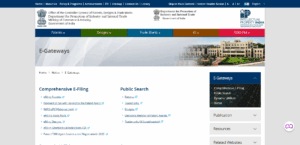
ipindia.gov.in website
Tip: Bookmark the InPASS website and ensure a stable internet connection, as the platform requires captcha verification for each search.
Step 2: Define Your Search Objective
Before starting, clarify your goal:
- Novelty Search: To determine if your invention is new and patentable.
- Freedom-to-Operate (FTO): To check for potential infringement risks.
- Invalidity Search: To challenge an existing patent’s validity.
- Competitor Analysis: To monitor competitors’ patent filings.
Each objective requires different search strategies. For example, novelty searches focus on prior art, while FTO searches emphasize active patents and their claims.
Tip: Break your invention into key components (e.g., for a solar-powered device, use terms like “solar”, “photovoltaic”, or “renewable energy”) to create a comprehensive keyword list.
Step 3: Conduct a Basic Keyword Search
- Navigate to the Patent Search tab.
- Use the dropdown menus to select fields like Title, Abstract, Claims, or Description.
- Enter relevant keywords in the search boxes. For example, for a solar panel invention, type “solar panel” in the Title or Abstract field.
- Verify the captcha code and click Search.
- Review the results, which include patent titles, application numbers, filing dates, and statuses.
Tip: Use synonyms and related terms (e.g., “solar cell,” “photovoltaic module”) to capture a broader range of results. Avoid overly narrow terms that might miss relevant patents.
Step 4: Leverage Advanced Search Techniques
To refine your search and improve accuracy, use InPASS’s advanced features:
a) Boolean Operators
- Combine keywords with AND, OR, and NOT to narrow or expand results.
- Example: solar AND panel retrieves patents containing both terms.
- Example: ‘solar’ OR ‘photovoltaic’ retrieves patents with either term.
- Example: solar NOT battery excludes patents related to batteries.
b) Wildcards
- Use wildcards to account for variations in spelling or word forms:
- * for multiple characters (e.g., panel* matches “panels,” “paneling”).
- ? for a single character (e.g., colo?r matches “color” or “colour”).
c) Field-Specific Searches
- Target specific fields to reduce irrelevant results:
- Example: Search solar panel in Claims to find patents with relevant technical details.
- Example: Search an inventor’s name (e.g., “John Doe”) in the Inventor field to track their filings.
d) Classification Codes
- Use International Patent Classification (IPC) or Cooperative Patent Classification (CPC) codes to search by technology category.
- Example: For solar panels, use IPC code H01L 31/00 (semiconductor devices for photovoltaic energy).
- Find relevant codes on WIPO’s IPC website or by reviewing similar patents.
Tip: Combine keywords with classification codes for precision. For example: solar panel AND H01L 31/00.
Step 5: Analyze Search Results
- Click on a result to view detailed information, including the patent’s abstract, claims, and full specification (if available).
- Note key details like:
- Application/Patent Number: For tracking or referencing.
- Publication Date: To confirm if the patent is active or expired.
- Claims: To assess the scope of protection.
- Compare results to your invention to identify similarities or differences.
Tip: Export or save results (e.g., as PDFs) for documentation. Use a spreadsheet to organize patent numbers, titles, and key findings.
Step 6: Check Patent and Application Status
- Use the Patent E-register tab to check a granted patent’s status:
- Enter the patent number and captcha code.
- Review details like renewal status, legal disputes, or expiration dates.
- Use the Application Status tab for pending applications:
- Enter the application number to view filing dates, examination status, or objections.
Tip: Regularly monitor competitors’ applications to anticipate new patents that could affect your FTO.
Step 7: Cross-Reference with Global Databases
While InPASS is excellent for India-specific searches, complement it with international databases for a comprehensive prior art search:
- WIPO PatentScope: For global patent filings.
- Google Patents: For user-friendly searches across multiple jurisdictions.
- USPTO Database: For U.S. patents, which often influence Indian applications.
Tip: Use similar keywords and classification codes across databases to ensure consistency.
Step 8: Seek Professional Assistance for Complex Searches
InPASS is user-friendly but can be challenging for complex searches involving ambiguous results or intricate claim analysis. Consider consulting a patent attorney to:
- Interpret claims and prior art.
- Conduct thorough FTO or invalidity searches.
- Draft patent applications based on search insights.
Tip: For startups on a budget, perform preliminary searches on InPASS before hiring a professional patent service provider to save costs.
Best Practices for Mastering InPASS
- Start Broad, Then Narrow: Begin with general keywords to capture all relevant patents, then refine with Boolean operators or classification codes.
- Use Multiple Fields: Search in Title, Abstract, and Claims to avoid missing key patents.
- Document Everything: Record search terms, results, and notes to build a robust prior art database.
- Stay Updated: Check for InPASS updates or new features, as the platform evolves to improve user experience.
- Combine Tools: Use InPASS alongside global databases and professional tools for comprehensive searches.
- Practice Regularly: Familiarity with InPASS’s interface and advanced features improves efficiency over time.
Common Challenges and How to Overcome Them
- Challenge: Overwhelming or irrelevant results.
- Solution: Use Boolean operators, wildcards, and field-specific searches to refine results. Exclude unrelated terms with NOT.
- Challenge: Missing prior art due to incomplete searches.
- Solution: Use synonyms, classification codes, and global databases to ensure thorough coverage.
- Challenge: Difficulty interpreting claims or legal status.
- Solution: Consult a patent attorney or use the Help tab for guidance on InPASS features.
Conclusion
Mastering InPASS is a game-changer for inventors, startups, and businesses navigating India’s patent landscape. By leveraging its advanced search features—keywords, Boolean operators, wildcards, and classification codes—you can conduct precise and comprehensive patent searches to assess novelty, avoid infringement, and gain competitive insights. Start with basic searches, refine your skills with advanced techniques, and complement InPASS with global databases for a holistic approach. For complex cases, don’t hesitate to involve a patent professional to maximise your results.
Ready to dive into InPASS? Visit https://ipindia.gov.in/SubMenu/Egateways and start exploring today. If you need help with specific search strategies or interpreting results, consider reaching out to a patent expert for tailored guidance.